Best Free GDPR Scanner Tools (2026): No-Signup Compliance Checkers Compared
Ott Ristikivi | Founder & CEO of SecureSpells
14 min read
SecureSpells
What a Free GDPR Scanner Can (and Can't) Tell You
A free GDPR scanner checks a single URL for the technical signals a regulator would also notice first — cookies, trackers, consent banner behavior, and basic security hygiene — and returns a score. Most ask for nothing but a URL; one tool in this comparison requires your email before showing any results. None of them can verify your privacy policy's accuracy or your team's ability to fulfill a deletion request. Treat it as a first-pass signal, not a sign-off.
Methodology and sources
We ran a live scan against each competitor tool using the same test domain, cookieyes.com, on 2026-10-01 — the screenshots in each section below are from those actual scans, not vendor marketing copy. That's one domain, not a representative sample, so treat the specific numbers (scores, tracker counts) as one data point rather than a guaranteed result on every site. Where a detail wasn't visible in our own scan, we say so and cite what the vendor states on its own page instead. We're not listing scan times in the comparison table below — on a one-site test, a "~30 seconds" vs "~2 minutes" difference says more about what each tool is measuring than which is faster, and we'd rather not imply a precision we don't have.
SecureSpells's own scan behavior is described directly from the product we build — we checked the actual check-gating code, not a third-party claim.
If a vendor changes its free tier, that changes this comparison — capabilities and signup requirements can shift without notice.
Quick comparison table
| Tool | No signup required | What it primarily checks | Source |
|---|---|---|---|
| SecureSpells | Yes | Cookie banner presence, pre-consent cookies/embeds, top 3 tracker domains, HTTPS on PII forms, privacy policy presence, security headers | securespells.com |
| TrustScan Website Privacy Audit | Yes (observed — no email, straight to results) | HTTPS, security headers, cookie consent, privacy policy, trackers, AI-disclosure signals | trustscan.dev |
| WebLegal.ai Scanner | Yes | Cookie banners, legal pages, company ID, pre-consent trackers; adapts to GDPR, UK GDPR, CCPA, PIPEDA, LGPD | weblegal.ai |
| Cookiebot Compliance Test | No — email required (marketing-consent checkboxes are optional) | Cookie/tracker inventory, categorization | cookiebot.com |
| ComplyDog Free Cookie Checker | Yes | Flat cookie list (name, domain, expiry, Secure/HttpOnly) — no categorization | complydog.com |
| ConsentStack Compliance Scanner | Yes | Pre-/post-"Reject" tracker firing by region (EU + US), tracker classification, regulation-cited fixes | consentstack.io |
| CookieYes Checker | Yes for the basic result; login for the detailed report | Cookie inventory by category (donut chart) | cookieyes.com |
"Observed" = from our own scan of cookieyes.com on 2026-10-01 (screenshots below). Everything else not marked "observed" is what the vendor states on its own page, not independently verified by us.
1. SecureSpells — runtime audit, free scan included
Best for: Agencies, SaaS teams, and developers who need evidence, not just a cookie list.
SecureSpells runs a live browser session against your URL rather than reading static page source, so it catches scripts that fire after page load or bypass a misconfigured consent banner — the failure mode most static cookie lists miss entirely. A full scan takes about 2 minutes.
What the free scan checks (confirmed against our own check-gating code, not guessed):
- Whether a cookie consent banner is present
- Cookies firing before consent
- Third-party embeds (e.g. YouTube, social widgets) firing before consent
- Your top 3 third-party tracker domains
- HTTPS on pages with personal-data forms
- Whether a privacy policy/notice is present
- Security headers (CSP)
Post-rejection tracking behavior — whether "Reject" actually stops a tracker, not just hides the banner — is part of the full engine but isn't one of the checks exposed in the free report. If that's specifically what you need to see for free, ConsentStack (further down this page) checks it in its free tier; SecureSpells checks it too, but only surfaces it in the paid report.
The free report doesn't mean a lighter scan — it means a partial view of a full one. SecureSpells always runs the complete audit, every check in the engine, and the risk score reflects everything it finds, whether or not that specific finding is shown in the free report. Upgrading doesn't trigger a deeper scan; it unlocks full visibility into which checks are behind the score you already received. That means a free scan can show a handful of passing checks and still carry a high risk score, because other checks — not exposed in the free view — are failing. The score is never softened to match what's visible for free.
Run it yourself: https://securespells.com — no signup to run the scan or view the first report. The report is yours via a shareable link for 14 days; saving it permanently, or re-running/scheduling repeat scans, requires a paid plan rather than just a free account.
Good: full runtime engine, not a static read; same risk score whether you pay or not; no signup to scan or see the first result. Bad: the free report surfaces only 7 of the engine's check categories, so a scan can look mostly clean while other (unshown) checks are failing behind the score; no free-tier way to save a report past 14 days or re-scan on a schedule.
(Public report screenshot coming soon — we're redesigning it.)
2. TrustScan Website Privacy Audit
Best for: A broad first-pass check that also flags AI-disclosure gaps.
TrustScan's audit evaluates a site across six categories — HTTPS, security headers, cookie consent, privacy policy, third-party trackers, and AI disclosure — and returns a 0–100 Privacy Trust Score. In our scan of cookieyes.com, it returned 95/100 ("Good"), with every check passing except a warning on third-party trackers (it flagged Google Analytics and Google Tag Manager). It also offers a downloadable report, a shareable link, and an embeddable score badge.
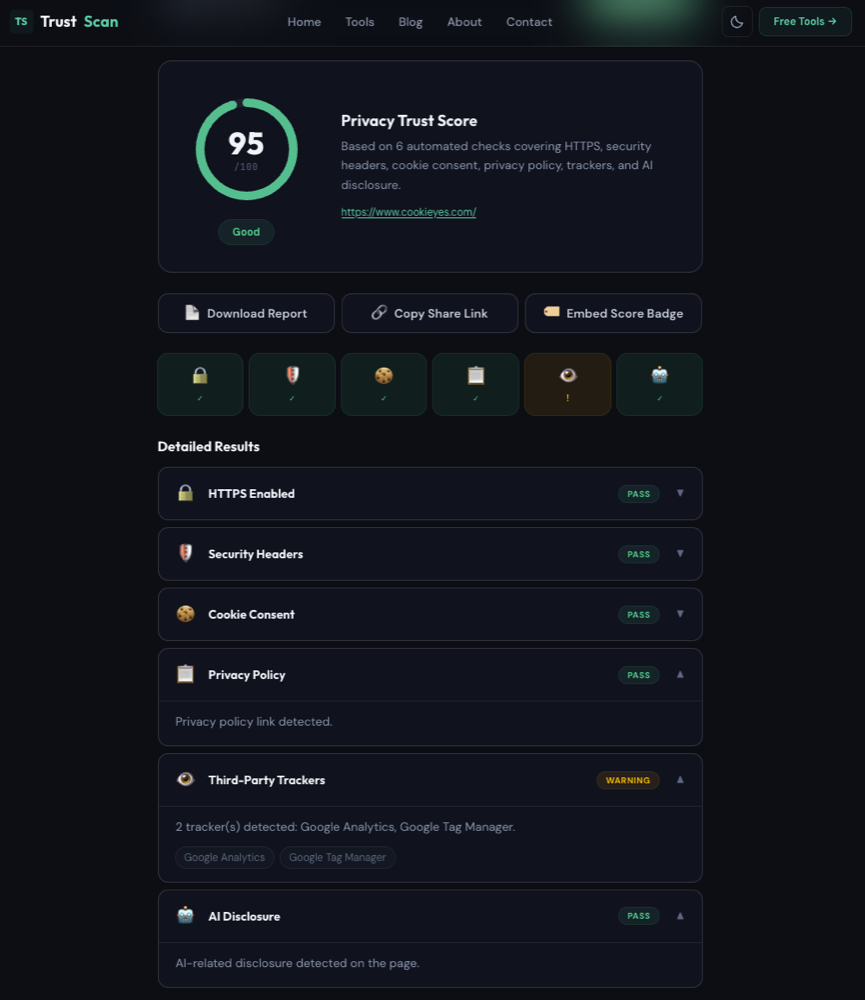
No signup, no email — we landed straight on the results page shown above.
Good: genuinely frictionless (no email, no account, nothing to dismiss before you see results); download/share-link/embeddable-badge options built in. Bad: very basic — six checks total, one line of explanation each, no remediation guidance beyond "warning" or "pass."
3. WebLegal.ai Scanner
Best for: A fast score plus a prioritized fix list, across multiple jurisdictions.
WebLegal.ai checks cookie banners, legal pages (privacy policy, cookie policy, terms of sale), company identification, and trackers loaded before consent, then returns a 0–100 compliance score. It explicitly adapts its checks to jurisdiction — the vendor states it covers GDPR, UK GDPR, CCPA/CPRA, PIPEDA, and LGPD — broader jurisdiction coverage than most tools on this list.
In our scan of cookieyes.com, it returned 65/100 ("Needs fixing"), flagged 2 trackers (Google Tag Manager, Google Analytics) loading before consent, and listed the privacy policy, cookie policy, and terms of sale as incomplete.
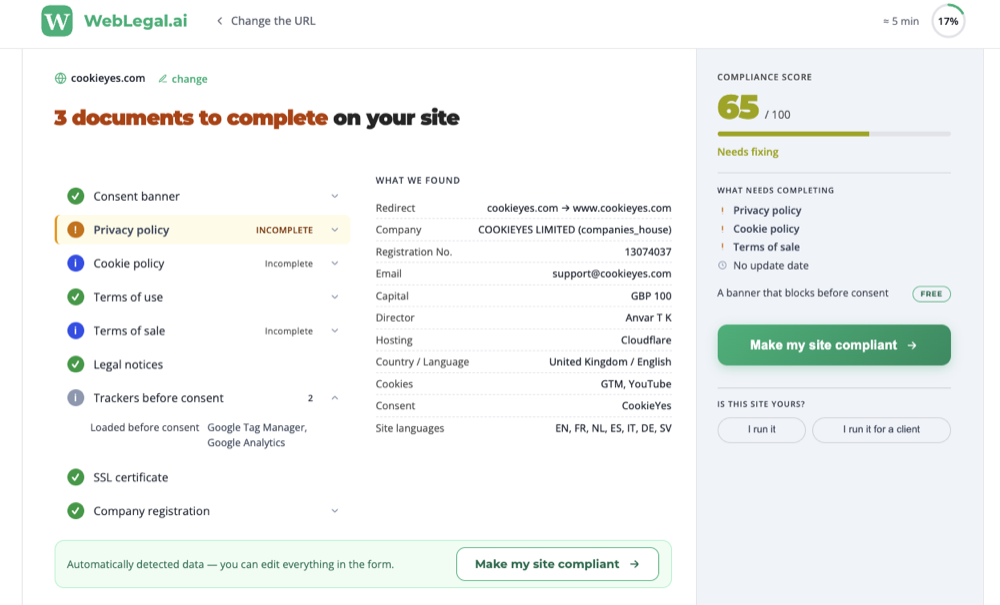
The "≈ 5 min" badge visible top-right in that screenshot is not the scan duration — it's WebLegal's estimate of how long the follow-on paperwork (completing the flagged privacy policy, cookie policy, and terms of sale) will take, tied to the "17%" progress ring next to it. The scan itself returned results quickly; the results page doubles as the start of a document-completion wizard, with "Make my site compliant" as the primary call to action in two places on the page.
Good: broadest jurisdiction coverage on this list (vendor states GDPR, UK GDPR, CCPA/CPRA, PIPEDA, LGPD); also looks up company registration details automatically (registration number, director, hosting provider) as a transparency check. Bad: the results page functions more like a lead-gen funnel for its paid document-completion product than a standalone scan report — the compliance score shares the page with a persistent upsell.
4. Cookiebot Compliance Test
Best for: A polished-looking report — if you're fine trading your email for it.
Cookiebot's scan itself runs without signup, and the result is well-presented: a live snapshot of your homepage, a share-results link, and a risk verdict ("Low risk," in our test of cookieyes.com).
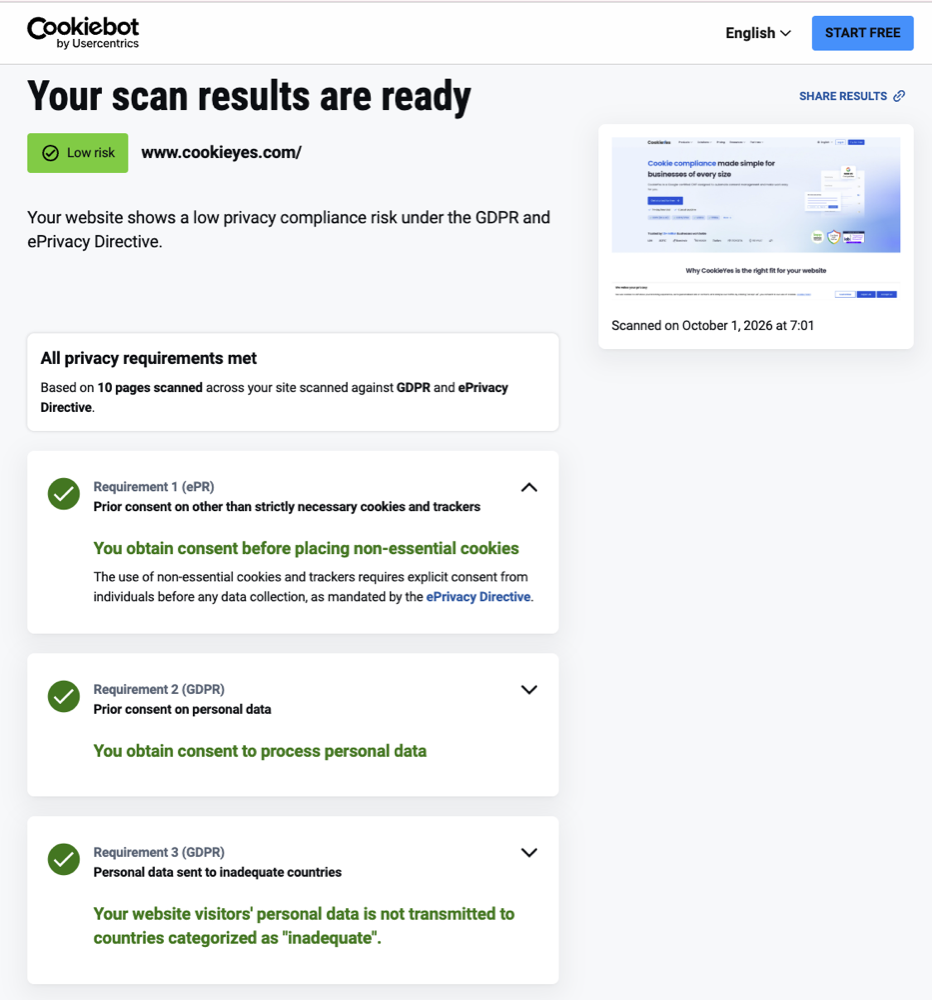
But the detailed findings — the actual tracker and cookie breakdown — are gated behind an email address. The form also has two checkboxes consenting to Usercentrics GmbH marketing emails and third-party data sharing — those are optional (only the email field is validated as required in our test, shown by the red error under it) — but you cannot see any detailed results without entering an email.
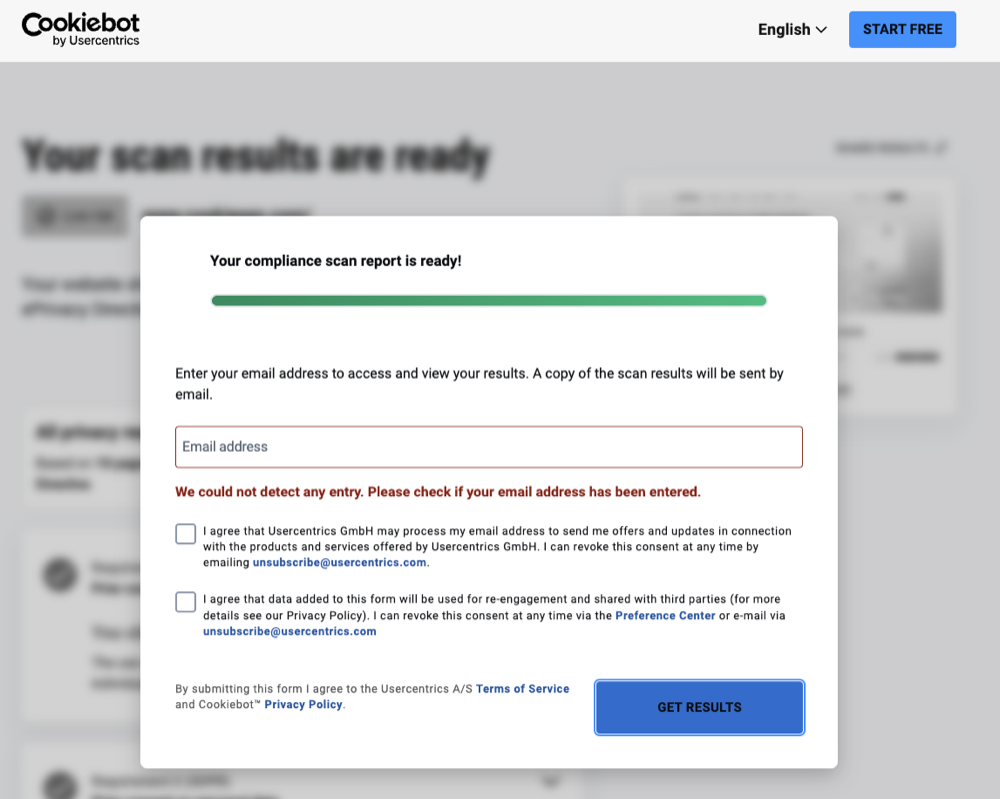
That's a meaningfully different kind of "free" than the no-signup tools elsewhere on this list — you're not paying with money, but you are paying with your email address (the marketing consent itself is skippable). Once unlocked, the breakdown itself is solid: trackers are categorized (Essential, Functional, Marketing, Analytics, Unclassified) per scanned page.
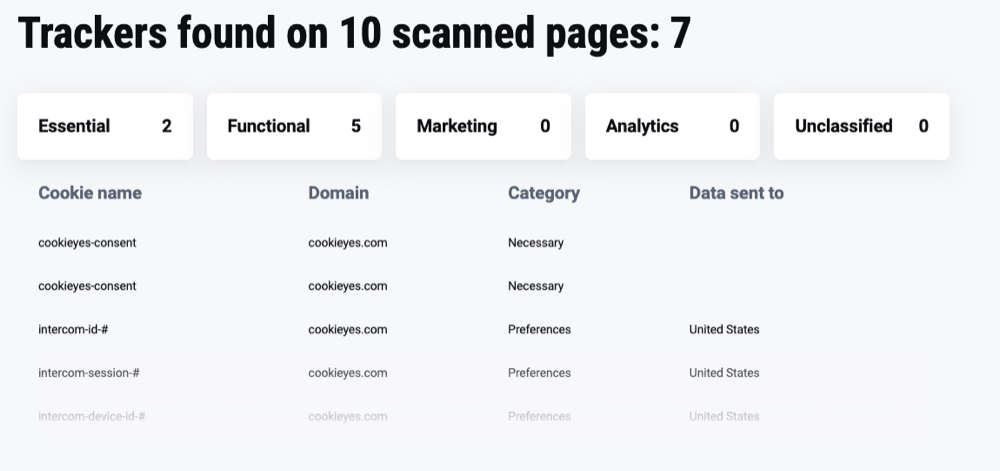
Good: genuinely nice presentation — a live homepage snapshot, a "Low risk" verdict, a shareable results link, and once unlocked, properly categorized trackers per scanned page; you can decline the marketing-consent checkboxes and still get results. Bad: email is mandatory to see anything beyond the headline verdict — this is the one tool here that isn't actually no-signup.
5. ComplyDog Free Cookie Checker
Best for: The fastest possible cookie count — nothing more.
ComplyDog's checker is genuinely frictionless: no account, no email, instant result. But it's also the thinnest tool in this comparison. In our scan of cookieyes.com, it returned a flat list of cookies with name, domain, expiry, and Secure/HttpOnly flags — no categorization into necessary, functional, analytics, or marketing at all.
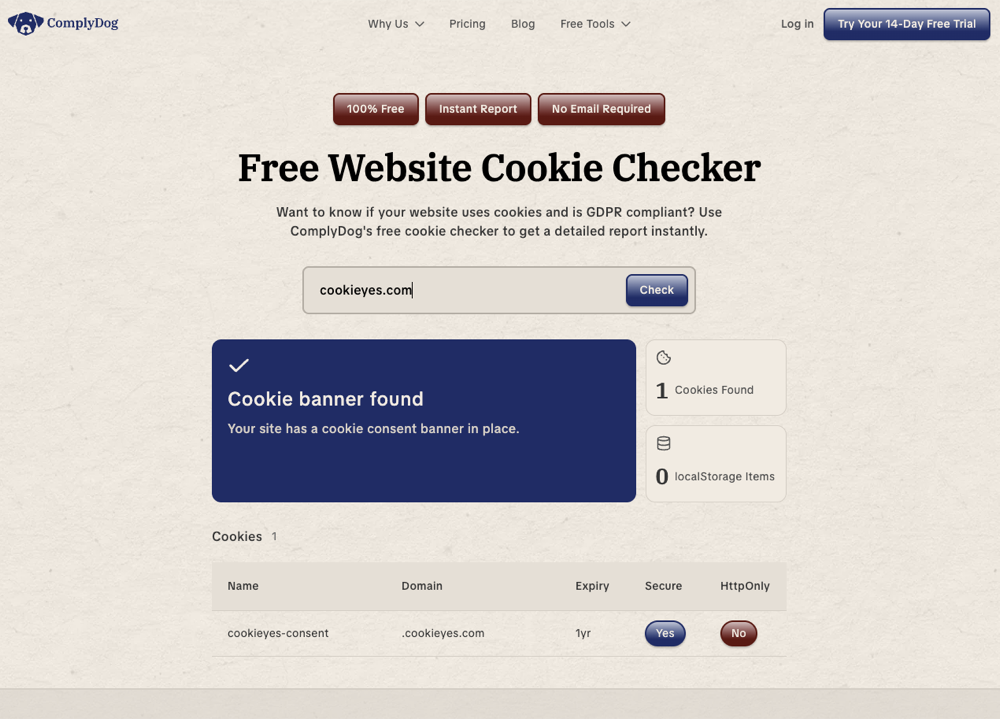
If you need a cookie's name and lifetime for a policy page, this does the job in seconds. If you need to know what each cookie is for, look elsewhere on this list.
Good: zero friction — no account, no email, instant result. Bad: the thinnest report in this comparison — a flat cookie list with no categorization at all, nothing about trackers, consent behavior, or anything beyond what's already in the browser's own cookie jar.
6. ConsentStack Compliance Scanner
Best for: The most detailed free report on this list.
ConsentStack is the most thorough free scanner we tested. In our scan of cookieyes.com it completed in 30.2 seconds, returned a score of 49/100, and flagged the site as non-compliant for both EU and US visitor profiles separately — 15 trackers, 6 cookies, 4 pre-consent issues, and 12 post-consent issues ("Reject" not actually stopping tracking).
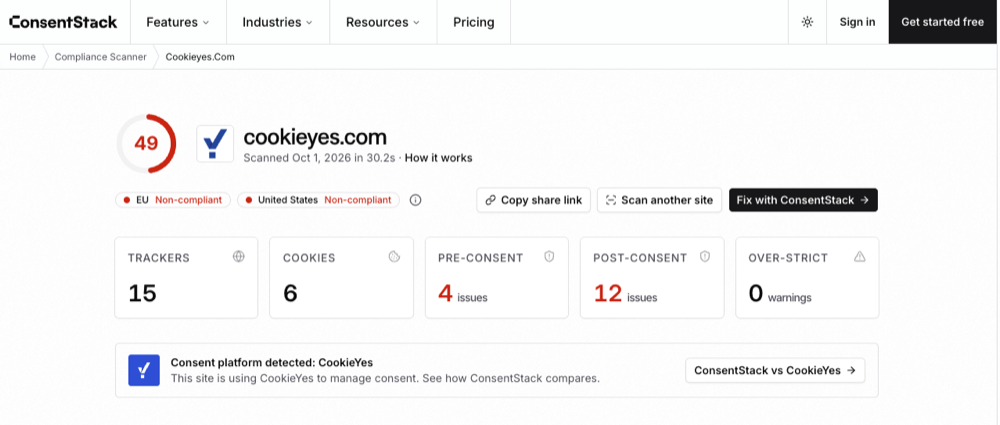
Each entry in its "Critical issues" table cites the specific regulation it violates (e.g. GDPR Article 5(1)(a), ePrivacy Directive Article 5(3)) alongside a concrete fix, and the tracker list classifies every tracker by product and category (Analytics, Marketing) with its own icon — closer to a real audit report than a cookie list. It also auto-detected the CMP already running on the test site and offered a direct comparison against it.
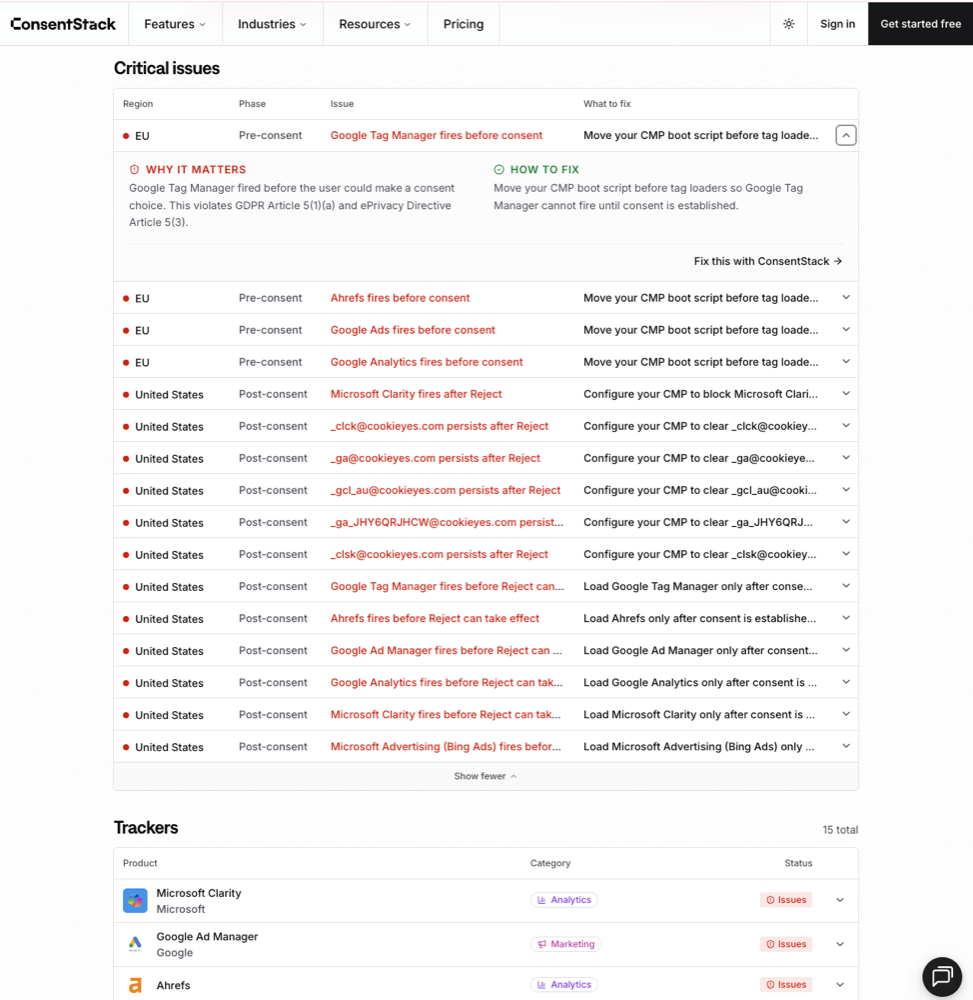
It's also the most shareable: a "Copy share link" button next to the score turns your scan into a sendable URL, no export or screenshot needed — useful if you're forwarding a result to a client or a dev team. The scan itself is free and requires no signup; fixing what it finds means adopting their CMP.
Good: the most detailed free report in this comparison, by a clear margin — regulation-cited findings, EU/US split, tracker classification, shareable link, no signup. Bad: the depth doubles as a sales surface — every issue links straight to "Fix this with ConsentStack," and the detailed view assumes you'll adopt their CMP rather than fix the underlying config yourself.
7. CookieYes Checker
Best for: A quick visual read on cookie categories.
CookieYes's free checker runs without signup and returns a donut-chart breakdown by category (Necessary, Analytics, Performance, Advertisement, Functional, Other). In our scan of cookieyes.com it found just 2 cookies total — a simple result — and prompts you to log in to CookieYes for a more detailed report rather than gating the basic result itself.
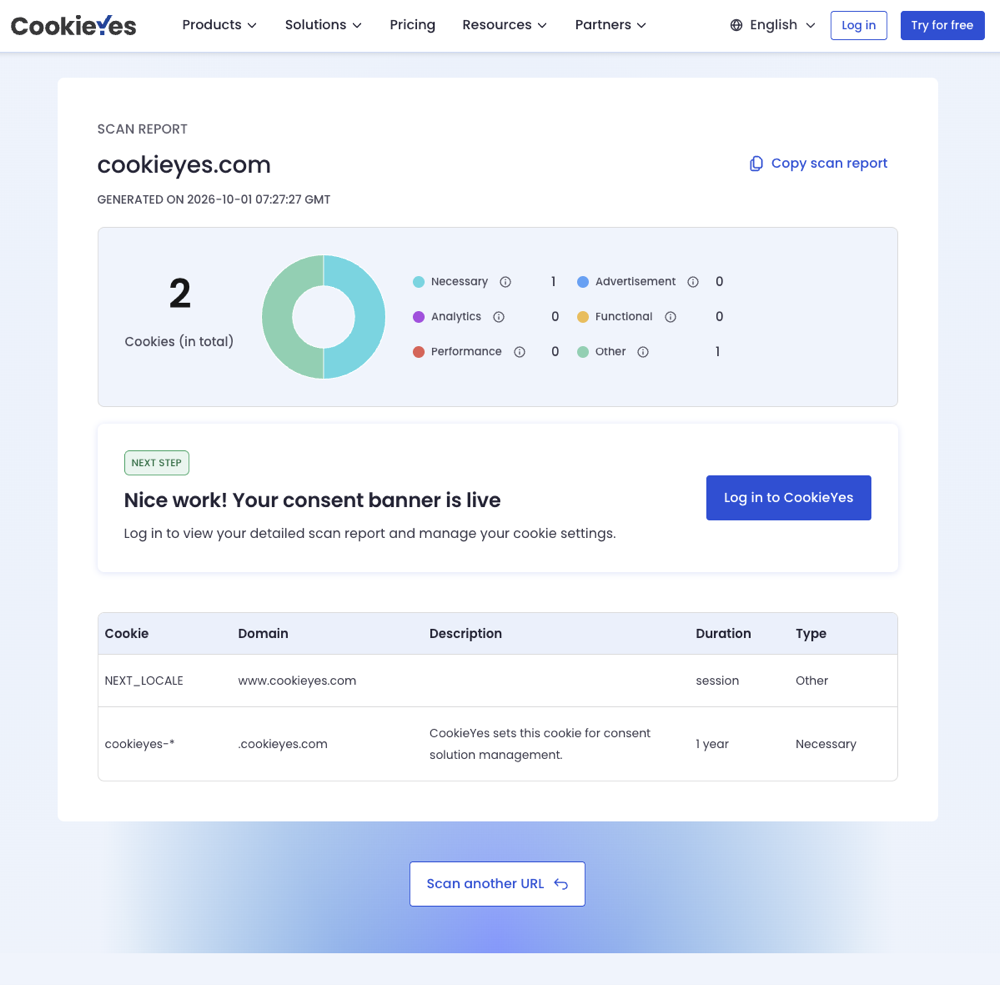
Good: no signup for the basic result; the donut-chart category breakdown is an easy visual for a non-technical stakeholder. Bad: shallow in our test (2 cookies, no trackers or consent-behavior checks at all), and the detailed report is a login wall, not a free feature.
What "free" doesn't cover, on any of these tools
Every tool in this comparison — SecureSpells included — operates on the same three layers, and free scanners only reliably cover the first one:
| Compliance layer | What it means | Covered by a free scan? |
|---|---|---|
| Technical | Do trackers fire before consent, and does "Reject" actually block them? | Pre-consent firing: yes, across this list. Post-"Reject" behavior: only ConsentStack shows it for free among the tools we tested. |
| Documentation | Does your privacy policy name every subprocessor and retention period? | Partially — some tools check for the page's presence, not its accuracy |
| Operational | Can your team actually delete or export a user's data within 30 days? | No — no automated scanner checks this |
A passing free scan is a useful signal that you're not making the most common mistake (trackers firing before consent). It isn't evidence that you'd pass a DPA review.
Run a free runtime scan: See what fires on your site before consent, in about 2 minutes.
How to pick one
- Just need a cookie list for a policy page? Any tool above works — ComplyDog or CookieYes are the fastest.
- Need to prove "Reject" actually stops tracking, for free? ConsentStack checks this specifically in its free report; most cookie-inventory tools don't. SecureSpells's engine checks it too, but only surfaces it in the paid tier.
- Need a broader first-pass score with a fix list? WebLegal.ai and TrustScan both return a scored checklist alongside the scan.
- Need the most detailed free report to show a team or client? ConsentStack's free scan goes deepest — regulation-cited issues and tracker classification — though fixing anything means adopting their CMP.
- Need ongoing evidence, not a one-off check? A free scan is a snapshot of one moment. If your tag manager or CMP config changes next month, re-scan — or use a tool with scheduled monitoring built in.
For a deeper look at why runtime behavior matters more than a cookie list, see runtime vs static scanning.
Frequently asked questions
Do free GDPR scanners require a credit card or signup?
Most of the tools in this comparison don't require signup or a credit card for the scan itself (SecureSpells, TrustScan, WebLegal.ai, ComplyDog, ConsentStack, CookieYes). Cookiebot is the exception: the scan runs without signup, but viewing the detailed results requires an email address. The marketing-consent checkboxes next to it are optional.
Can a free scanner replace a legal GDPR audit?
No. Every vendor reviewed here, including SecureSpells, only covers the technical layer reliably — trackers, cookies, and consent behavior. None of them verify your privacy policy's legal accuracy, your subprocessor contracts, or your operational ability to handle a data subject access request.
What's the difference between a cookie scanner and a runtime compliance audit?
A cookie scanner typically reads what's present after the page loads and lists it. A runtime audit observes a live browser session and records what fires before and after consent — which is where most real violations (pre-consent tracking, a "Reject" button that doesn't actually block anything) actually happen.
Related articles
- The Auditor Workbench: turning scanner findings into defensible reports
- Best website privacy scanner tools for cookies & trackers 2026
- Runtime GDPR scanning vs. static scanners
- Is your website GDPR compliant? Free test
- Best cookie audit tools (2026): runtime vs static scanners
- Cookies loading before consent