The Auditor Workbench: Turning Scanner Findings Into Defensible Reports
Ott Ristikivi | Founder & CEO of SecureSpells
10 min read
SecureSpells
What a Scanner Can't Know About Your Client's Site
A runtime scanner tells you what fired on a page and when — it has no way to know that a cookie named live_user_hash is actually a fraud-prevention session cookie, or that a flagged vendor has a signed data processing agreement. The Auditor Workbench is where an agency records that missing context: a verification decision, a legal ground, and a written rationale, tied to one specific finding. The raw scan is never edited — the decision sits on top of it, fully traceable, and (if you choose) carries forward to every future scan of that domain.
Handling GDPR Audit False Positives & Cookie Misclassifications
Every tool in our free GDPR scanner comparison — SecureSpells included — does the same fundamental thing: it observes what a browser does on your site and reports it. That's genuinely useful, and it's also where the usefulness stops. A scanner can tell you a cookie fired before consent. It cannot tell you why — whether that cookie is a third-party ad pixel that shouldn't be there, or a session cookie the checkout flow actually depends on. Not every flagged item is a real violation: some are false positives, and some are misclassifications a scanner has no context to avoid.
For an agency running audits across dozens of client sites, that gap becomes a recurring problem: every scan produces findings that need a human to look at them and say "this one's fine, here's why" — and without a system for recording that, the same explanation gets written from scratch, in an email or a spreadsheet, every single time a client asks about it.
The Auditor Workbench is SecureSpells' answer to that gap, and as far as we're aware, no other tool in this category — including every scanner in our free-tools comparison — has an equivalent.
A finding, reviewed: DPIA example
Here's a real finding from a production account: a "DPIA May Be Required" check, flagged Medium severity under GDPR Article 35.
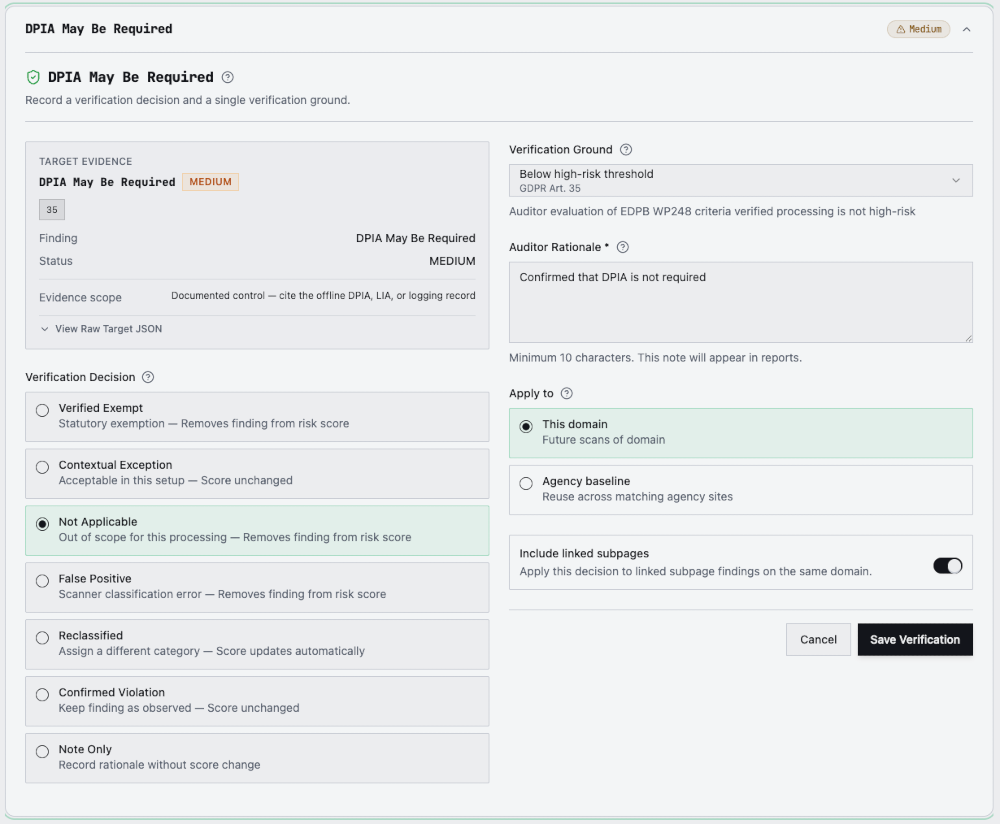
The auditor reviewed the processing against the EDPB's WP248 high-risk criteria, concluded a full DPIA wasn't required, and recorded that conclusion directly against the finding: decision Not Applicable, verification ground "Below high-risk threshold (GDPR Art. 35)", with a short rationale. The decision is scoped to this domain, so it carries forward automatically to the domain's future scans — the same question doesn't need re-answering on next month's rescan.
The seven verification decisions
Every decision is one of seven, and each has a defined effect on the risk score — this isn't a free-text override, it's a constrained set designed so the score always means something specific:
| Decision | What it means | Effect on score |
|---|---|---|
| Verified Exempt | Allowed without consent under a legal exemption (e.g. a strictly necessary cookie) | Removed from score |
| Not Applicable | The check doesn't apply to this site or this processing | Removed from score |
| False Positive | The scanner misclassified something — e.g. a first-party cookie flagged as a tracker | Removed from score |
| Reclassified | Assign the item a different category (cookie reclassification — see below) | Score updates automatically |
| Contextual Exception | Acceptable in this specific setup, but not a legal exemption | Unchanged — reasoning recorded |
| Confirmed Violation | Reviewed and kept as observed — a real issue, not yet fixed | Unchanged — reasoning recorded |
| Note Only | Record a rationale without changing anything | Unchanged |
The distinction between "removed from score" and "unchanged" matters: an auditor can't make a real violation disappear by noting it away. Confirmed Violation and Contextual Exception explicitly leave the score alone — they're for recording that a human looked at something, not for making it vanish from the report.
Reclassifying Cookie Findings & Overriding Scanner Alerts Step-by-Step
Cookie reclassification is a distinct flow from the generic finding review above — built specifically for individual cookies and trackers, not whole findings. Here's the real-world case, step by step:
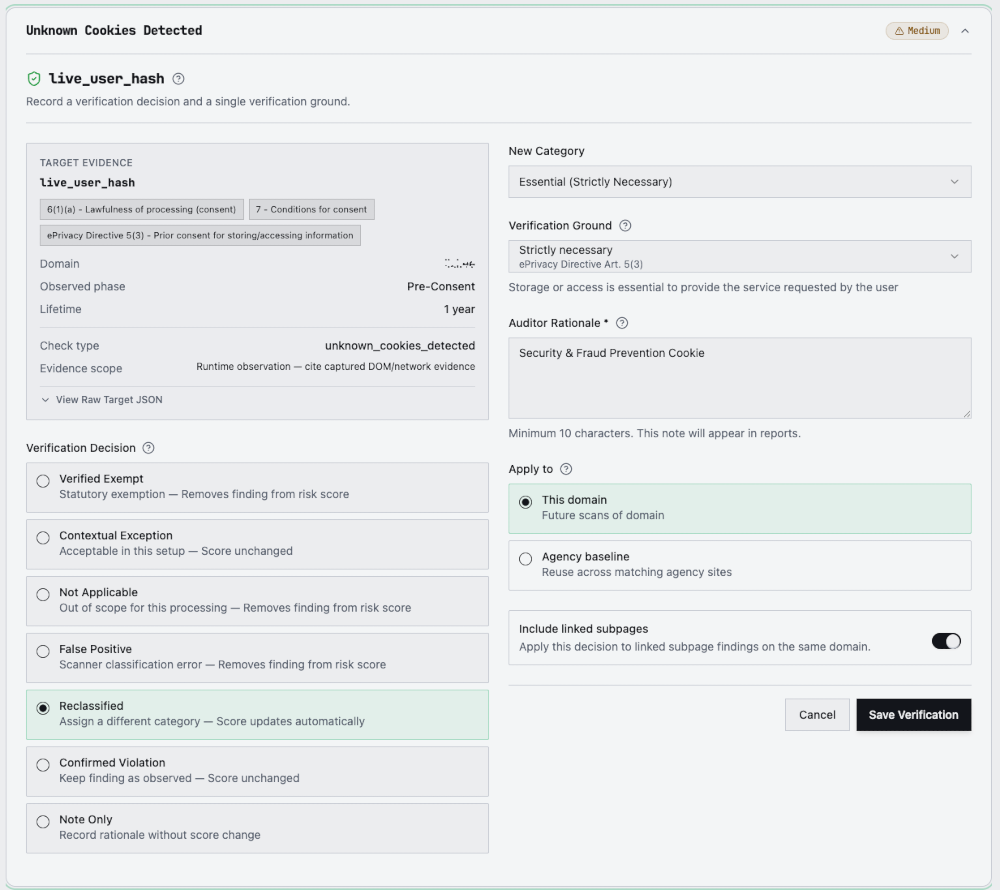
- The scanner flags an unclassified cookie. A cookie named
live_user_hashis detected under "Unknown Cookies Detected" — a name that gives no indication of its purpose, so it's treated as an unclassified risk by default. - The auditor identifies its real purpose. In this case, a security/fraud-prevention session cookie.
- The auditor selects Reclassified and assigns the new category: Essential (Strictly Necessary).
- The tool auto-links the matching legal ground — ePrivacy Directive Art. 5(3), the "strictly necessary" exemption — so the category and the citation can't drift out of sync.
- The auditor writes a short, specific rationale ("Security & Fraud Prevention Cookie") — it goes straight into the client report.
- The score updates automatically to reflect the new classification.
Where a decision applies
Every decision has a scope, and the choice matters for how much leverage it has:
- This domain — applies to this site only, and is reused automatically on that domain's future scans. This is the default, and the safe choice for anything client- or site-specific.
- Agency baseline — applies everywhere the same item appears, across every domain in the agency's account. Useful for a vendor or cookie an agency has verified once and sees repeatedly across clients (a shared analytics stack, a common CMP's own cookies) — but a baseline decision affects every matching client, so it's deliberately the less-default option.
- Include linked subpages — extends either scope to the same item when it's also detected on crawled subpages of the same domain, so one decision doesn't need repeating page by page.
For an agency running the same stack across many client sites, the agency baseline is effectively a growing, reusable ruleset — verify a vendor once, and it stops generating the same finding across every client that uses it.
Scope only matches on the exact item, though — see the FAQ below for what happens when a different cookie shows up.
Documenting Defensible Legal Grounds for GDPR Article 5(2) Accountability
GDPR Article 5(2) sets out the accountability principle: a controller must be able to demonstrate compliance, not just claim it. A verification decision that just says "this is fine" demonstrates nothing — it's a controller's opinion with no evidence attached. The Auditor Workbench is built around that distinction:
- Every decision pairs a verification ground (a specific statutory basis — a GDPR article, an ePrivacy Directive article, an EDPB guidance reference) with a written rationale, not one or the other.
- The rationale field enforces a 10-character floor so an empty or placeholder note can't be saved — it's a guardrail, not a quality bar, which is why the product's own guidance for auditors is blunt about it: write every rationale as if the client's DPO or a regulator will read it, because they may.
- Reclassification decisions auto-link the category to its matching legal ground (see the cookie example above), so the citation can't drift out of sync with what was actually decided.
- Nothing here is free text dumped into a database — it's structured enough to show up, unedited, in the client-facing PDF report as a specific, attributable, dated decision.
Raw score vs. effective score — nothing is overwritten
The scanner's original result is never edited. SecureSpells keeps two numbers:
- Raw score — exactly what the scan measured, unchanged forever, kept for chain of custody.
- Effective score — the raw score with verification decisions applied, shown in the client-facing report once at least one decision affects it.
That split is the whole point: a client (or their DPO, or a regulator) can see both the unreviewed scanner output and the auditor-reviewed result, and nothing about the original evidence was altered to get there.
The client PDF report reflects this directly — it adds a Verification Decisions section listing every verified finding: the item, the decision, the legal ground, the auditor's note, and who verified it, with a date. Auditor notes are shortened to 100 characters in the PDF, which is why the rationale in both examples above leads with the reason first.
Who can do this
Verification is an agency-tier capability, not a free-scan feature: agency Owners and Admins can record, edit, or revoke decisions. Members see every decision and its badge on the report but can't change them — read access without write access. Seven check categories are explicitly excluded from verification entirely: scanner failures (nothing to verify if the scan couldn't load the site), zero-weight informational signals (checks that don't affect the score in the first place), and summary/aggregation checks that recalculate automatically from the findings underneath them.
Why this is the differentiator, not a feature
Our free GDPR scanner comparison found that every tool we tested — automated, no human in the loop — produces the same kind of output: a list of what fired, with no way to say "we looked at this one and it's fine, here's why." That's fine for a first-pass check. It's not enough for an agency that has to stand behind a report in front of a client's legal team.
The Auditor Workbench doesn't make the scanner smarter. It gives the human who is smarter about a specific client's business a structured, auditable place to say so — and makes sure that judgment call survives the next rescan instead of getting re-litigated from scratch.
See the engine behind the Auditor Workbench: run a free runtime scan and see what it actually detects before you decide if your team needs to review it.
Frequently asked questions
I verified one cookie — does the scanner now pass every cookie on my site?
No. A verification decision is tied to the exact item you verified — for a cookie, that's its specific name, within the scope (this domain, or your agency baseline) you chose. It is not a blanket pass for the check type. If a different, previously-unseen cookie appears on a later scan, it's a new, unverified item and will surface as its own "Unknown Cookies Detected" finding, requiring its own review.
Does marking a finding "Confirmed Violation" or "Contextual Exception" remove it from the report?
No. Those two decisions, along with Note Only, explicitly leave the risk score unchanged and keep the finding visible — they record that an auditor reviewed it and reached a conclusion, without making it disappear. Only Verified Exempt, Not Applicable, and False Positive remove a finding from the score.
Can a Member on my agency's team verify findings?
No. Verification (recording, editing, or revoking a decision) is restricted to agency Owners and Admins. Members have read-only access — they can see every decision and its badge on a report, but the Verify and Edit controls aren't available to them.
Does verifying findings change the raw scanner score?
No. The raw score is the unedited scanner result and never changes. Verification decisions produce a separate effective score, shown in the client report once at least one decision affects it — the original scan result stays intact for chain of custody.