Cookie Audit Software: Tool Classes, What Each Does, and How to Choose (2026)
Ott Ristikivi | Founder & CEO of SecureSpells
6 min read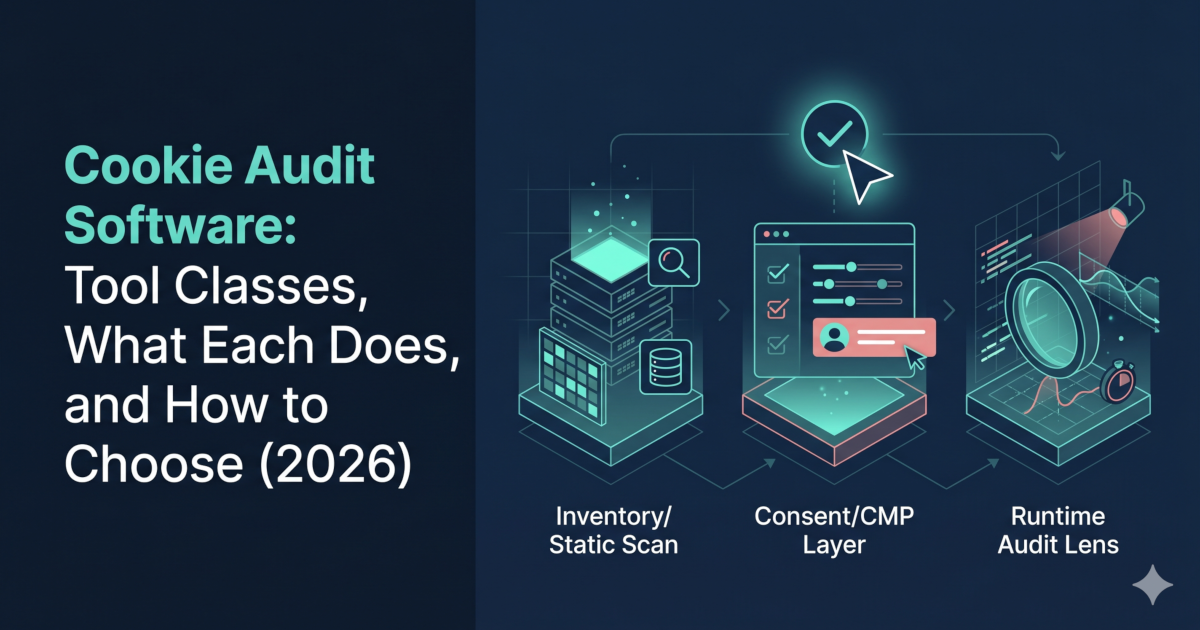
SecureSpells
Cookie audit software checks which cookies and tracking scripts your website sets, when they load relative to user consent, and whether any run before consent is given. The category includes three distinct tool classes — inventory scanners, consent management platforms (CMPs), and runtime auditors — each with a different job. Choosing the right class before comparing vendors saves time and avoids compliance gaps.
Cookie audit software is searched by teams trying to solve compliance problems that range from "I need a cookie policy page" to "I need to prove to a regulator that nothing fires pre-consent." Those are different jobs requiring different tools. This guide classifies the category, explains what each class can and cannot do, and maps classes to use cases. Scope: EU/EEA GDPR and ePrivacy Directive. UK GDPR applies equivalent rules.
This article is for educational purposes and does not constitute legal advice. For compliance decisions, consult a qualified legal or privacy professional.
Legal framing references: GDPR (consolidated text on EUR-Lex), ePrivacy Directive 2002/58/EC, and EDPB Guidelines 05/2020 on consent. This article focuses on technical behavior observed in browser tests.
- Cookie audit software
Any tool that checks a website's cookie and tracking behavior. Includes static scanners that catalog cookies from HTML snapshots, CMPs that collect and record consent, and runtime auditors that observe live browser behavior and verify execution timing relative to consent.
- Runtime cookie audit
An audit that runs the site in a real browser and records what cookies and scripts actually execute—before consent, after rejection, and after acceptance. Produces behavioral evidence, not just a list.
- Pre-consent firing
A script or cookie that loads or executes before the user has interacted with the consent banner. Under GDPR and ePrivacy, non-essential tracking must not fire pre-consent.
Three classes of cookie audit software
| Tool class | What it produces | What it cannot produce | Best for |
|---|---|---|---|
| Inventory / static scanner | Cookie list, categories, policy export | Evidence that cookies wait for consent | Policy pages, cookie declarations |
| Consent management platform (CMP) | Consent records, banner UI, policy docs | Proof that tags are actually blocked | Consent collection and records |
| Runtime auditor | Pre/post-consent network trace, behavioral evidence | Not a substitute for CMP consent records | Proving compliance to regulators, debugging tag managers |
These classes are often combined: a CMP for consent collection + a runtime auditor for verification. Using only a CMP or only a static scanner is a common compliance gap.
What each class of cookie audit software does
Inventory / static scanners
Static cookie scanning tools crawl your site — often just the homepage — and return a list of cookies they find. They may categorize them (functional, analytics, marketing) and generate a cookie declaration for your privacy policy.
Strengths: Fast, easy to set up, suitable for generating policy-page content.
Limitation: They observe a snapshot, not a live session. They cannot tell you whether a cookie loads before the user clicks "Accept" or whether "Reject all" actually stops a tracker. Static tools do not produce behavioral evidence.
Consent management platforms (CMPs)
CMPs like Termly, OneTrust, Cookiebot, and Osano collect and store consent signals from users, display the banner, and generate consent records. Some include built-in cookie scanners.
Strengths: Required for compliant consent collection; provide audit trail of consent records.
Limitation: A CMP proves a user was shown a banner and made a choice; it does not by itself prove that your tags actually respected that choice. Tag manager misconfiguration — e.g. analytics firing on page load before the CMP has initialized — is a common failure mode that a CMP cannot detect.
For a CMP comparison by team size, see Termly vs OneTrust (2026): SMB vs Enterprise.
Runtime auditors
Runtime cookie audit software runs your site in a real browser and records what actually happens: which scripts fire, when, and whether they execute before or after the consent state is set. This is the most direct and reliable class for detecting pre-consent execution and consent bypass in real browser sessions.
Strengths: Produces behavioral evidence for the tested URL/profile and is closer to real-world enforcement checks than static inventories. Detects misconfigured tag managers, third-party embeds that load outside CMP control, and hidden requests.
Limitation: Does not replace consent records (CMP) or cookie policy documentation (inventory scanner). Pair all three.
Use the free cookie audit tool to run a runtime pass on your domain — it observes pre-consent behavior in a live browser session without requiring signup.
How to choose cookie audit software by job-to-be-done
| Job | Tool class needed | Example |
|---|---|---|
| Generate a cookie declaration for your privacy policy | Inventory / static scanner | Any crawler-based tool |
| Collect and record user consent choices | CMP | Termly, OneTrust, Cookiebot |
| Prove pre-consent tags do not fire | Runtime auditor | SecureSpells |
| Debug why a tag fires despite banner | Runtime auditor | Runtime trace with consent-state simulation |
| Regulatory response / DPA inquiry evidence (for tested pages/profiles) | Runtime auditor output | Behavioral report for tested scenarios, not a cookie list |
| Ongoing monitoring after releases | Runtime auditor with scheduling | SecureSpells scheduled scans |
Why static cookie audit software misses common violations
The most common GDPR cookie violation is not missing cookies from a policy page — it is non-essential scripts firing before the user has accepted. Static scanners cannot detect this because they do not simulate a browser session with a consent state.
Common gaps that only runtime auditors catch:
- Google Tag Manager firing analytics on "All Pages" without a consent check — fires pre-consent on every page load.
- Third-party embeds (chat widgets, social pixels) that initialize on script load regardless of CMP state.
- CMP initialization race conditions — the consent state resolves after the tag already fires.
- Consent bypass on subpages — scanner tested the homepage; violation is on a product or checkout page.
See cookies loading before consent for a detailed breakdown of common pre-consent patterns.
See what fires before consent on your site — a runtime cookie audit takes under two minutes.
After you pick your cookie audit software
Whichever tool class you use, re-audit after every change to your tag setup, CMP configuration, or third-party integration. Cookie compliance is not a one-time state — new scripts and updates create new risk. Why recurring compliance monitoring beats a one-off audit covers this pattern in detail.