Cookie Banner Compliance (2026): EDPB Rules + a 5-Minute Runtime Test
Ott Ristikivi | Founder & CEO of SecureSpells
7 min read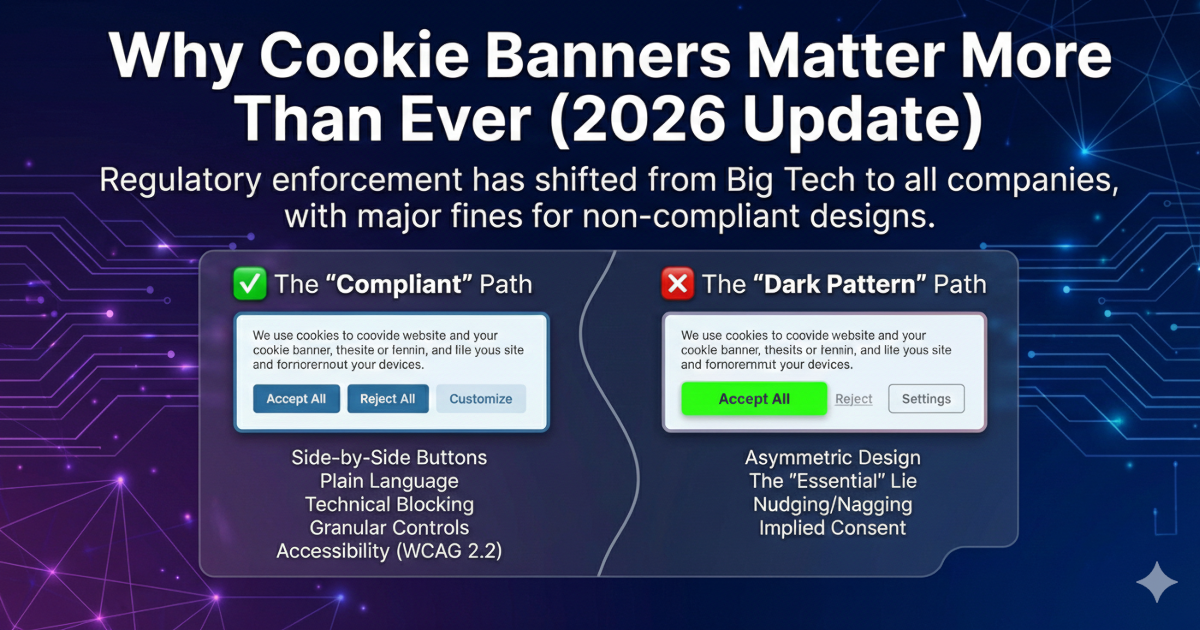
AI-generated (Gemini Pro)
Why Cookie Banners Matter More Than Ever (2026 Update)
A cookie banner is UI, not proof of compliance. In EU/EEA contexts, the key test is behavioral: do non-essential tags and cookies fire before consent, and does “Reject all” actually block tracking? A compliant banner is a gate, not a notice. The fastest way to validate is a runtime audit that observes real requests and cookies in a browser session.
In 2020, landmark fines against Google (€100M, confirmed by France's Conseil d'État) and Amazon (€35M by France's CNIL) signaled that the "Wild West" of tracking was over. However, many smaller companies assumed regulators were only targeting Big Tech.
2025 and 2026 have proven that theory wrong.
The most significant recent enforcement came in September 2025, when France's CNIL fined SHEIN €150 million. The violations were clear-cut: cookies were placed before the banner appeared, and the "Refuse all" button was technically ineffective (clicking it still resulted in new cookies being placed). This case, alongside increasing audits of regional retailers and SaaS platforms, confirms that cookie compliance is now a universal requirement for any entity targeting EU users.
Legal Basis: ePrivacy Directive + GDPR Cookie consent requirements stem primarily from Directive 2002/58/EC (ePrivacy Directive), which mandates user consent for non-essential cookies. GDPR Article 6(1)(a) and Article 7 define what constitutes valid consent (specific, informed, unambiguous, freely given). Enforcement actions (like the SHEIN fine) cite both laws.
What a GDPR-Compliant Cookie Banner Must Include in 2026
Regulatory standards have evolved. A compliant banner today must go beyond simple "Accept" buttons, as set out in the EDPB Cookie Banner Taskforce report:
A GDPR-compliant cookie banner must provide equal visual prominence for "Accept All" and "Reject All" buttons on the first screen, block all non-essential cookies until affirmative consent is obtained, allow granular category controls (e.g., Analytics, Marketing), and enable users to withdraw consent as easily as they granted it. Under the European Accessibility Act (effective June 2025), banners must also meet WCAG 2.2 accessibility standards.
Core Requirements:
- Button Parity: The "Reject All" button must be as easy to find, click, and see as the "Accept All" button. No more hiding rejection behind "Settings." For Consent Mode v2 requirements with Google tags, see our dedicated guide.
- Prior Consent (Zero-Load): No non-essential cookies (Analytics, Meta Pixel, etc.) may be placed until the user provides affirmative consent.
- Granular Controls: Users must have the option to toggle specific categories, such as Analytics, Marketing, or Personalization.
- Withdrawal Ease: Withdrawing consent must be as simple as giving it—typically via a persistent "Privacy" icon or a footer link.
- Accessibility (EAA 2025): Under the European Accessibility Act (in force from 28 June 2025), your banner must be WCAG 2.2 compliant, ensuring screen readers and keyboard-only users can manage their privacy.
CNIL "refuse all" first-layer guidance (2024/2025)
France's CNIL, in line with EDPB cookie-banner guidance, has reinforced that "refuse all" must be as easy as "accept all" on the first layer. Users must not have to open "Settings" or "Customize" to reject non-essential cookies; a one-click "Refuse all" must be present and equally visible. The SHEIN fine (2025) cited ineffective reject options. First-layer parity is required for valid consent under the ePrivacy Directive and GDPR Article 7.
The Do's and Don'ts of Consent Design
✅ The "Compliant" Path
- Side-by-Side Buttons: "Accept All" and "Reject All" on the first layer with identical visual weight.
- Plain Language: "We use cookies to improve your experience. You can accept, reject, or customize your choice."
- Technical Blocking: Use a CMP that prevents scripts from firing during the initial page load.
❌ The "Dark Pattern" Path (High Risk)
- Asymmetric Design: Making the "Accept" button bright green and the "Reject" button a tiny, grey text link.
- The "Essential" Lie: Labeling third-party tracking pixels (Meta, TikTok, Google Ads) as "strictly necessary." Note: While strictly first-party, aggregate analytics may qualify as legitimate interest under certain DPA interpretations, third-party tracking pixels categorically require consent.
- Nudging/Nagging: Repeatedly showing the banner to users who have already clicked "Reject."
- Implied Consent: Using text like "By continuing to browse, you agree to cookies." (This has been illegal for years).
Comparison: Compliant vs. Non-Compliant
| Feature | Compliant Implementation | Non-Compliant Implementation |
|---|---|---|
| Rejection | "Reject All" on the first screen. | Hidden inside "Options" or "Settings." |
| Visuals | Equal button size, contrast, and color. | "Accept" is a bold button; "Reject" is a link. |
| Scripts | Blocked until the user clicks "Accept." | Firing immediately on page load. |
| Toggles | All non-essential categories default to "Off." | Pre-ticked boxes for analytics or marketing. |
Why Static CMP Reports Miss the Problem Most Consent Management Platforms provide "scan results" showing which cookies exist on your site. But these scans can't verify runtime behavior: whether a tracker fires before consent, whether a rejected cookie is truly deleted, or whether a third-party script loads async after the banner appears. Runtime auditing (used by compliance intelligence platforms like SecureSpells) simulates real user sessions to measure actual data leakage, not just declared functionality.
The Bottom Line: Trust as a Competitive Advantage
In 2026, a cookie banner is often a user's first interaction with your brand. A deceptive, hard-to-use banner doesn't just invite a CNIL or DPC audit; it erodes user trust before they've even seen your product.
Several DPAs have conducted automated "sweep" audits (as referenced in the EDPB Taskforce report), scanning hundreds of websites for pre-consent violations. If your technical implementation doesn't match your UI, you are at risk.
A 5-minute runtime verification checklist
Before outsourcing an audit, here's a practical checklist you can run yourself:
- Visual Inspection: Open your site in incognito mode. Is "Reject All" visible on the first screen? Are both buttons equally prominent?
- Network Tab Test: Open Chrome DevTools → Network tab. Reload the page. Do you see requests to
google-analytics.com,facebook.net, ordoubleclick.netbefore you click "Accept"? If yes, you're in violation. - Accessibility Check: Use a screen reader (NVDA, JAWS) or tab through the banner with only your keyboard. Can you reach and activate all buttons?
- Runtime Audit: Use a runtime compliance audit to simulate consent states and catch async script leaks that manual testing misses. Run the free cookie audit tool and confirm “pre-consent” and “reject all” behavior in a single report.
See also: Banner installed ≠ tracking stopped: runtime data.
Is your banner actually blocking scripts? Most platforms "show" a banner but don't "stop" the trackers. You can use tools like SecureSpells to quickly check how your website is performing under the hood.
Frequently Asked Questions
Q: Can I use pre-ticked checkboxes for cookie consent?
No. Under GDPR Article 4(11), consent requires an "affirmative act." Pre-ticked boxes are explicitly prohibited by EDPB Guidelines 05/2020.
Q: Do I need to block Google Consent Mode v2 pings?
No, if configured correctly. Google Consent Mode v2's "denied" pings send anonymized signals and are considered legitimate interest by most DPAs. However, if you're using default "granted" mode, you are violating GDPR.
Q: How long can I store a user's consent choice?
EDPB Guidelines recommend re-asking for consent every 6-12 months, though no fixed legal maximum exists. Storing consent indefinitely without re-validation is considered poor practice.
Q: Are cookie banners required for B2B SaaS platforms?
Yes, if you use non-essential cookies (analytics, marketing pixels). The ePrivacy Directive applies to all website visitors, regardless of whether they're business users or consumers.
Is your current CMP actually blocking trackers, or just showing a cosmetic banner? SecureSpells runs a full runtime audit to verify if your banner is interactive, if it effectively blocks pre-consent network activity, and if scripts are illegally bypassing your consent rules.