AI-generated (Gemini Pro)
How to Detect Cookies Loading Before Consent (Technical Audit Guide)
How to Detect Cookies Loading Before Consent (Technical Audit Guide)
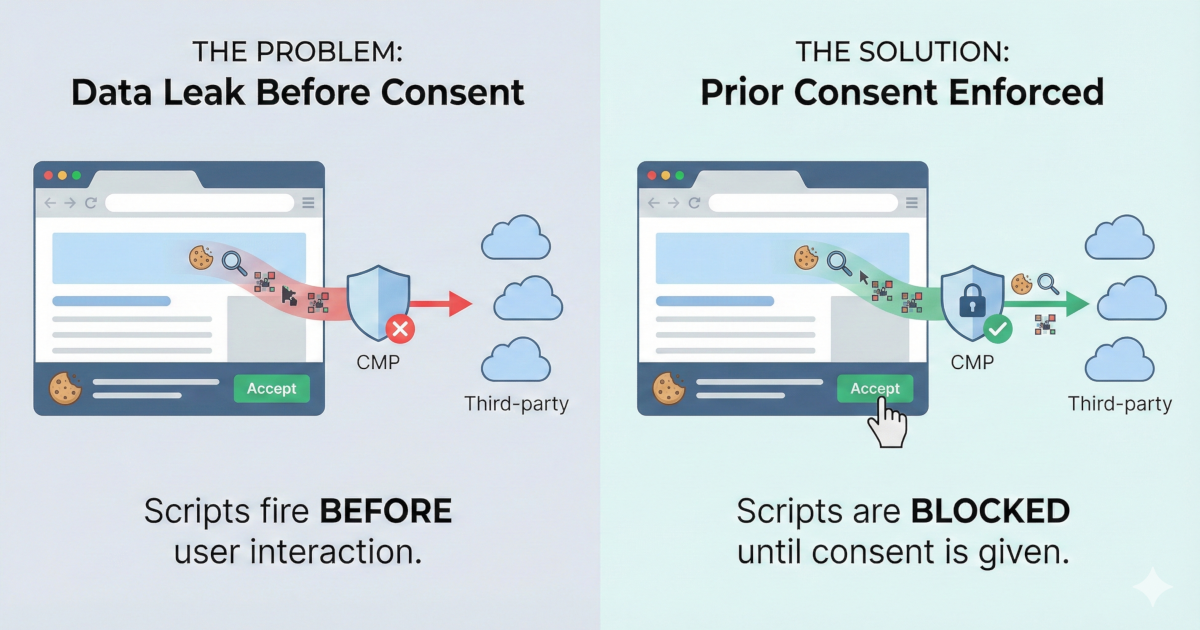
Cookies loading before consent is a GDPR violation that occurs when tracking scripts (analytics, pixels, ads) execute on page load before the user interacts with the consent banner. This happens when CMPs display a banner UI but fail to programmatically block non-essential scripts until consent is granted, resulting in unauthorized data transfer and breach of GDPR Article 7. Detection requires runtime monitoring to observe actual network traffic and script execution during a clean browser session.
Prior Consent is a technical requirement often overlooked by developers and compliance officers. This guide explores how to identify and remediate "leaky" implementations where data is processed before a user provides legal consent.
- Cookies loading before consent
A GDPR violation where third-party scripts (e.g., Google Analytics, Meta Pixel) execute on page load before the user interacts with the consent banner, leaking data without valid consent under Article 7.
- CMP (Consent Management Platform)
The tool that displays the cookie banner and records consent; it must programmatically block non-essential scripts until the user opts in.
The Problem: The "Silent" Violation
Most cookie banners appear compliant at the UI level but fail at the network level. When tracking scripts execute immediately upon page load, they bypass the CMP's intended purpose. This results in:
- Unauthorized Data Transfer: PII and tracking identifiers are sent to third parties without a legal basis.
- Article 7(1) Breach: GDPR Article 7 requires consent to be freely given and informed. If execution happens before the click, the consent is neither.
- Operational Risk: Manual checks are error-prone and fail to capture dynamic scripts that may be injected by other third-party dependencies.
Check Your Site Now
You can use a behavioral scanner like SecureSpells to quickly identify any issues by simulating a clean user session across your entire domain.
Check your site now: Run a free scan below. If the result shows scripts or cookies firing before consent, you have an Article 7 exposure.
If the scanner results indicate "High Risk" or list pre-consent network requests, your site is likely leaking data in violation of current privacy standards (including the ePrivacy Directive Article 5(3)).
How to Fix It
1. Configure Tag Manager Consent Mode
Ensure your Tag Manager (GTM or similar) is configured so that analytics and marketing tags fire only on a specific consent event (e.g., consent_default_granted), rather than the standard Page View or Initialization triggers. Learn more: Google Consent Mode v2 guide.
2. Wrap Hardcoded Scripts
For scripts loaded directly in the HTML <head>, prevent auto-execution by changing the script type. This allows your CMP to "unlock" the script only after the user accepts.
- Original:
<script src="..."> - Compliant:
<script type="text/plain" data-category="analytics" src="...">
3. Continuous Re-Auditing
After implementing fixes, perform a re-audit using runtime compliance scanning. Privacy compliance is not a static state; new marketing tags or third-party updates can re-introduce vulnerabilities at any time.
Summary
Detecting cookies loading before consent requires either manual inspection via the browser Network tab (filtering by domain before interaction) or an automated behavioral audit. SecureSpells automates this with multiple checks to report exactly which scripts fire pre-consent, allowing you to resolve Article 7 violations and minimize regulatory risk.
Related Articles